|
|

AutoDesSys products:  
|
|||||
|
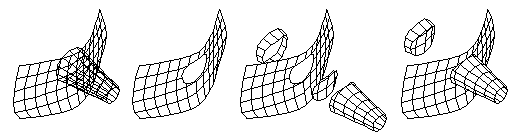
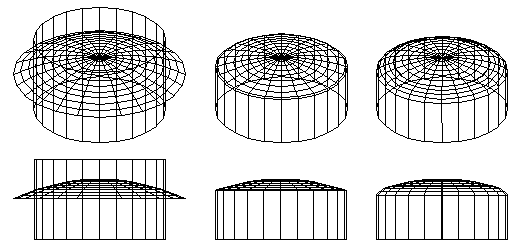
Trim, split and stitch operations  Trim and Stitch are Boolean-like operations that can be applied to surface objects. They can be used to trim (cut) one surface with another, or to split one surface along its intersection with another. The pieces resulting from a trim operation can then be stitched (joined) together to produce a new object. Surface objects can also be trimmed or split with simple lines in a direction perpendicular to a reference plane. Left to right: Two surface objects; trimming one with the other; splitting
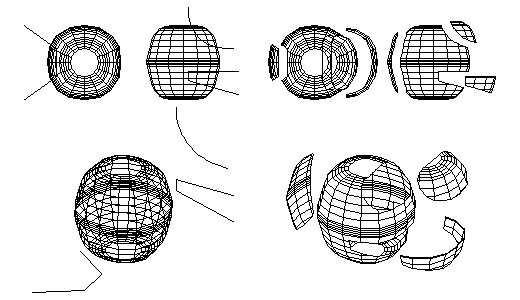
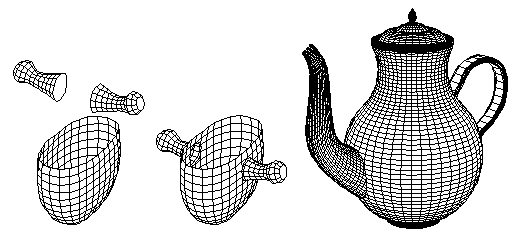
the objects with each other; stitching the pieces back together. Splitting a spherical object with three lines. Stitching the pieces after a trim or a split operation allows you to compose surfaces into unified objects and to create a variety of forms that cannot be created directly.
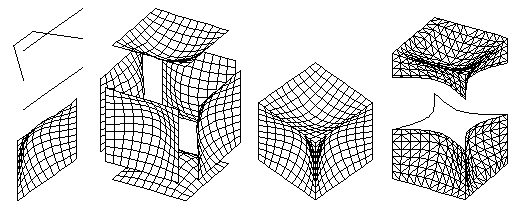
The stitch operation can also be used independently by itself to connect pieces that may have been created using any of the tools in form•Z. In the example below, a rectangular mesh is copied once for each side of a cube and the pieces are stitched together to produce a solid object.
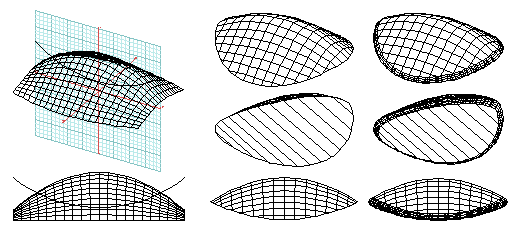
When trimming and stitching two surfaces or a surface with a line, the resulting stitch line can also be rounded, as illustrated by the examples bellow.
|
|
|
|||
home | news | products | downloads | support | forum | gallery | academic | sales | about us | search
Copyright © 2009 AutoDesSys, Inc. |
 |
PH - 614.488.8838 | FX - 614.488.0848 Send comments to: ZwebMaster@formz.com |