|
|

AutoDesSys products:  
|
|||||
|
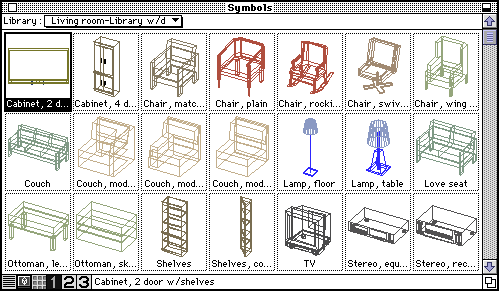
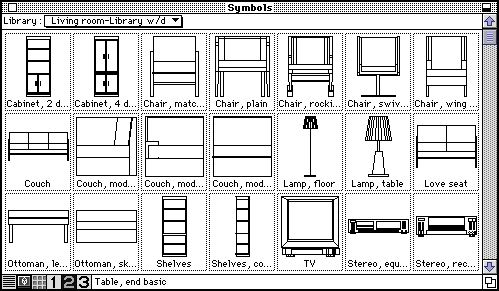
2D and 3D symbols  Any combination of 2D shapes in drafting, or any combination of 3D objects in modeling can easily be defined as symbols and stored in symbol libraries. One unique aspect of the form•Z symbol libraries is that they contain both a modeling and drafting portion where frequently used objects can be stored as 3D symbols together with their orthographic projections as used in floor plans and elevations in drafting. In addition symbol libraries can carry up to three levels of detail so that the same symbol can be used with little detail in a small drawing scale or more detail in a larger scale. Symbols in general not only save the time needed to reconstruct or copy a model used elsewhere, they are also efficient memory-wise. form·Z is shipped with symbol libraries of frequently used furniture. The library for living room furniture is partially shown below.
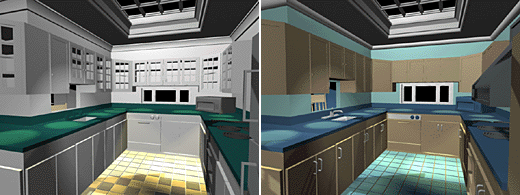
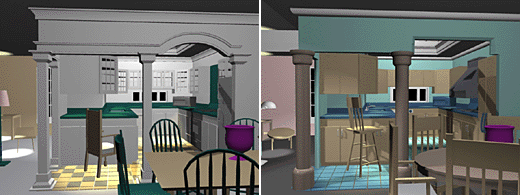
Because symbols are placed as instances, it is easy to apply universal changes that affect all the placements of the same symbol. Also, symbols make it convenient to evaluate alternatives for the same design. This is illustrated below. The two views of the same kitchen, where all the furnishings have been defined as symbols, show how the design changes by simply using different sets of symbol definitions. These designs are actually updated as soon as a different symbol library is linked to the project.
|
|
|
|||
home | news | products | downloads | support | forum | gallery | academic | sales | about us | search
Copyright © 2009 AutoDesSys, Inc. |
 |
PH - 614.488.8838 | FX - 614.488.0848 Send comments to: ZwebMaster@formz.com |