AutoDesSys products: form&middotZ
 
Sweeps along arbitrary paths

Open or closed profile shapes can be swept along both planar and non-planar paths that have an arbitrary position in 3D space. They are created with two clicks of the mouse. The first click selects the profile to be swept (source shape), and the second click selects the path line along which it will be swept.

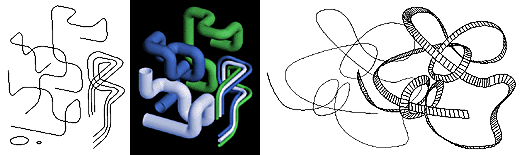
Left: Utility pipes derived by sweeping circles along 3D paths, Right: Freely unfolding "ribbons."


The source profile can be scaled and/or rotated as it is swept, which offers a large variety of possibilities for creating imaginative 3D forms. An option to keep the source profile perpendicular to a reference plane is also available, which easily lends itself to the generation of objects such as roads.

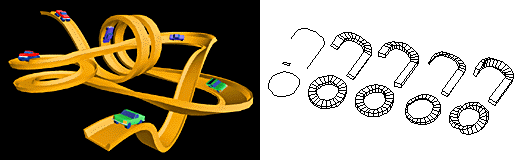
Left: A toy race track. Right: Sweeps with the source profile scaled and/or rotated.


A preview dialog, where a swept object can be inspected and changed before its actual generation, is also available. In this dialog, the parameters of a swept object can be manipulated interactively, which includes the positioning, scaling, and rotation of the profile shape. This makes the creation of sweeps a very intuitive operation.

Two unique variations of the sweeps are those generated from two different source shapes and those created along two paths. These sweeps offer additional impressive possibilities for creating some very challenging 3D forms.

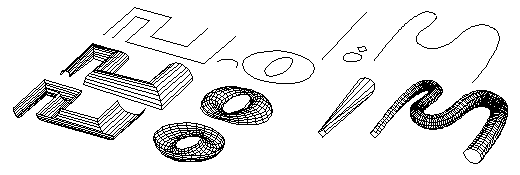
Left:Two-path sweeps. Right: Two-source sweeps.


form·Z feature list

Introduction


Interface


Modeling

• Primitives
• Spherical objects
• Metaballs
• 3D solids and 2D shapes
• Patterned polygons
• Derivative surfaces, extrusions, enclosures
• Parallel objects
• Frames

• Projection objects
• Unfolding
• Terrain models
• Revolved objects
• Helixes
• Screws and bolts
• Stairs
• Sweeps
• Draft Sweeps
• Skinning
• Lofting
• S-lofts
• Meshed objects
• Subdivisions
• Moving and disturbing meshes
• Deformations
• Bending along curves
• Morphing
• Image based displacements
• Rounding
• Blending and filleting
• Draft angles
• Splines and c-curves
• C-Meshes
• Nurbz
• Formula curves and surfaces
• Patches
• Metaformz
• Boolean operations
• Trimming, splitting, and stitching
• 2D and 3D sections
• Deriving contours
• Lines of intersection
• Joining and separating
• Grouping and ungrouping
• Placing and editing text
• Symbols
• Editing 3D lines
• Converting representations of objects
• Extracting controls
• Inquiring and measuring
• Repairing objects and projects
• Moving, rotating, resizing, and mirroring
• Clones
• Attaching
• Repair
• Replace
• Inserting
• Deleting

Drafting


Rendering


Special features

• Extensive import/export
• Panoramic views
• Straight up perspectives
• View matching
• Walk through animation
• Rapid prototyping
• 2D/3D digitizing

next »