AutoDesSys products: form&middotZ


Nurbz


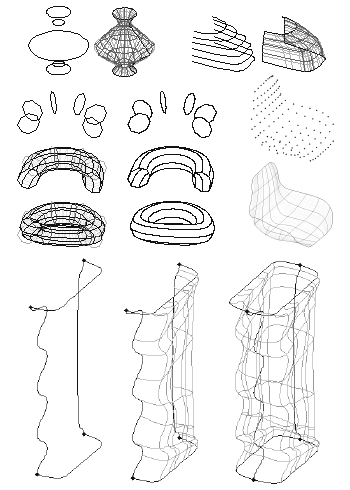
While the c-meshes include NURBS surfaces, they are frequently of a mixed character and also include facetted parts. In form·Z it is also possible to generate pure NURBS surfaces, which are specifically called nurbz. These are generated from control lines in ways similar to but also different from c-meshes. Available generation methods are by lofting, from boundary curves, from UV curves, and by points. These are illustrated below.


\

\


form·Z feature list

Introduction


Interface


Modeling

• Primitives
• Spherical objects
• Metaballs
• 3D solids and 2D shapes
• Patterned polygons
• Derivative surfaces, extrusions, enclosures
• Parallel objects
• Frames

• Projection objects
• Unfolding
• Terrain models
• Revolved objects
• Helixes
• Screws and bolts
• Stairs
• Sweeps
• Draft Sweeps
• Skinning
• Lofting
• S-lofts
• Meshed objects
• Subdivisions
• Moving and disturbing meshes
• Deformations
• Bending along curves
• Morphing
• Image based displacements
• Rounding
• Blending and filleting
• Draft angles
• Splines and c-curves
• C-Meshes
• Nurbz
• Formula curves and surfaces
• Patches
• Boolean operations
• Trimming, splitting, and stitching
• 2D and 3D sections
• Deriving contours
• Lines of intersection
• Grouping and ungrouping/Joining and separating
• Placing and editing text
• Symbols
• Editing 3D lines
• Converting representations of objects
• Extracting controls
• Inquiring and measuring
• Repairing objects and projects
• Moving, rotating, resizing, and mirroring
• Clones
• Attaching
• Replace
• Inserting
• Deleting

Drafting


Rendering


Special features

• Extensive import/export
• Panoramic views
• Straight up perspectives
• View matching
• Walk through animation
• Rapid prototyping
• 2D/3D digitizing

next »