AutoDesSys products: form&middotZ


Revolved objects


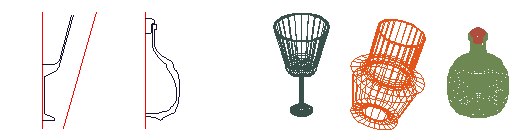
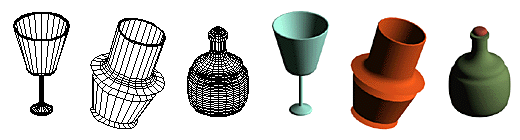
Open or closed profile shapes can be revolved about an axis to derive a vast variety of lathed objects, which can be revolved about a complete circle or a partial arc. The revolve operation is executed with just two clicks of the mouse. The axis of revolution can be any of the orthogonal (Cartesian) axes, or any line drawn anywhere, or a segment from a previously created object. The source profile can be a shape drawn specifically for the revolve operation, or any face of a previously created object. These unique variations of the revolve operation found in form·Z offer tremendous flexibility, especially when lathed objects need to be created in positions relative to other objects.

Above left: the same profile is revolved about two different axes producing two distinctly different objects. Right: two profiles are revolved about the same axis producing a bottle and its cork. The examples are shown in wireframe, hidden line, and shaded images.

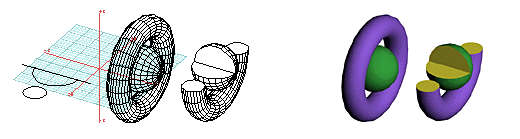
A circle and arc are revolved about the same axis to first produce a complete torus (donut) and sphere, and then a partial torus and sphere.

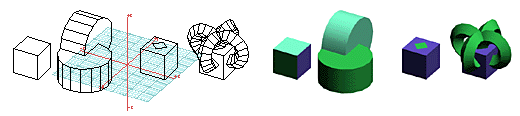
Above left: two faces of a cube are revolved about two of its edges. Right: a shape drawn on the top surface of a cube is revolved about the top four edges of the cube.


form·Z feature list

Introduction


Interface


Modeling

• Primitives
• Spherical objects
• Metaballs
• 3D solids and 2D shapes
• Patterned polygons
• Derivative surfaces, extrusions, enclosures
• Parallel objects
• Frames

• Projection objects
• Unfolding
• Terrain models
• Revolved objects
• Helixes
• Screws and bolts
• Stairs
• Sweeps
• Draft Sweeps
• Skinning
• Lofting
• S-lofts
• Meshed objects
• Subdivisions
• Moving and disturbing meshes
• Deformations
• Bending along curves
• Morphing
• Image based displacements
• Rounding
• Blending and filleting
• Draft angles
• Splines and c-curves
• C-Meshes
• Nurbz
• Formula curves and surfaces
• Patches
• Boolean operations
• Trimming, splitting, and stitching
• 2D and 3D sections
• Deriving contours
• Lines of intersection
• Grouping and ungrouping/Joining and separating
• Placing and editing text
• Symbols
• Editing 3D lines
• Converting representations of objects
• Extracting controls
• Inquiring and measuring
• Repairing objects and projects
• Moving, rotating, resizing, and mirroring
• Clones
• Attaching
• Replace
• Inserting
• Deleting

Drafting


Rendering


Special features

• Extensive import/export
• Panoramic views
• Straight up perspectives
• View matching
• Walk through animation
• Rapid prototyping
• 2D/3D digitizing

next »